Showing posts with label postgres. Show all posts

ETL & Enterprise Level Practices


ETL Strategies & Pipelines have now become inevitable for cloud business needs. There are several ETL tools in the market ranging from open-source ones such as Airflow, Luigi, Azkaban, Oozie to enterprise solutions such as Azure Data Factory, AWS Glue, Alteryx, Fivetran, etc. But what makes the data pipelines to be Industry-ready and robust? The practices and the industrial standards that are put into the architecture and design of the pipelines do. In this article, we touch upon these aspects and characteristics of Enterprise-level practices that can be followed to make a robust data pipeline. 

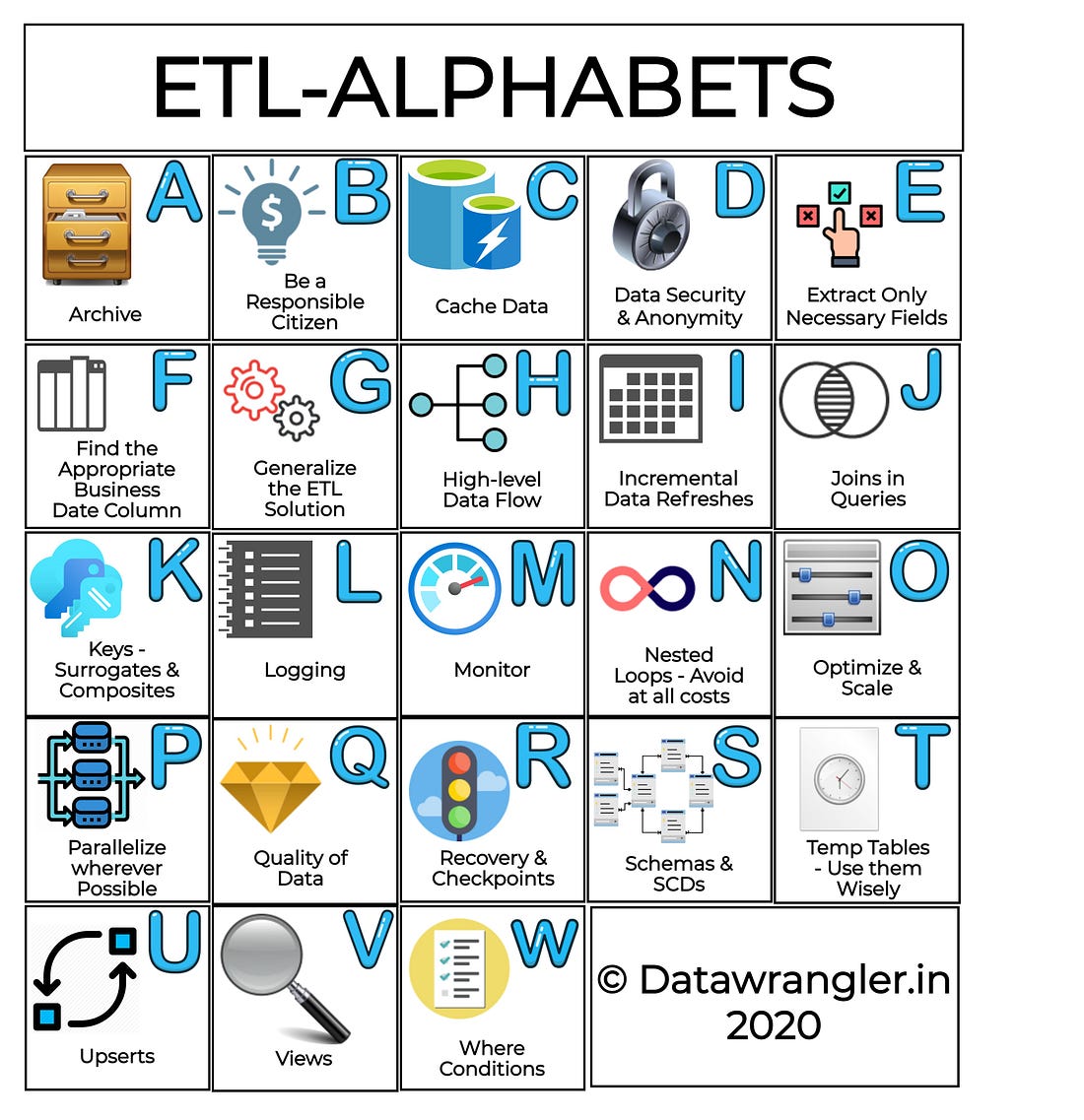
ETL-Alphabets

We will be explaining the ETL strategies, alphabetically as shown in the illustration below:

Archival Strategies

Archive older unused data, to keep the data warehouses clean and performant. By performing such cleanups, unused indexes can be cleared, and unused space can be retrieved.

Be a responsible citizen

  • Select only those columns that are required for the analysis - While performing the extraction, select only the required columns. This will help in increasing the performance of the data warehouse and also, speeds up the extraction process.
  • Power down resources when not in use. If you are using clusters for processing or databases for staging; make sure to power down the resources that are not in use.

Cache Data

Accessing a table more often? Why not cache that table for rapid usage? For example, Spark’s createOrReplaceTempView function creates just a mere reference to the table whereas the saveAsTable() stores the table to HDFS. This won’t make much of a difference for smaller datasets, yet could be a pivotal improvement while transforming larger datasets.

Data Security & Anonymity

Mask the sensitive information or better not to bring those to the target Data warehouse. Always perform your ETL practices over VPNs or secured groups. Always use a key vault service (Vault, Azure Key Vault, AWS Secrets Manager), etc. in case if you don’t have a Universal Authentication Identity Service Provider protected by individual Service Principals.

Extract Only Necessary Fields

You don’t always require a select * from table . Select only those fields that are required from the source database tables. If you are wondering if you needed any columns in the future, many of the ETL solutions such as Azure Data Factory, provide options to facilitate schema drift. This could be a major game-changer in terms of the performance and efficiency of the ETL processes.

Find the Appropriate Business Date Column

Identifying the fields is one, and identifying the business date columns is another. The business date columns are essential since the data lake timestamp columns are not always reliable. These columns are essential for performing incremental changes to your data warehouse.

Generalize the ETL solution

The ETL solution that you create should be able to accommodate changes dynamically. Changes shouldn’t bring about havoc, rework, or major code changes. Make sure to bring in a lot of dynamic parameters and configurable placeholders such as File Location, File System Location, Logging Location, Name of Facts, Dimensions, Staging Tables, etc.

High-Level Data flow

Keep your ETL Pipelines and the corresponding data flows, as simple as possible. Plan before you start, draft a blueprint of what your pipeline is about to accomplish. This helps in figuring out those activities that are tricky and are prone to failures, such as processing at the staging layer and copy to the destination data warehouse.

Incremental Data Refreshes

Incremental data refreshes are nothing but bringing in the data that has changed or newly inserted into the Data Lake. Business date stamps can be very helpful while performing incremental data refreshes. Incremental data refreshes can be performed wherever it's applicable since performing a complete refresh of the data for the whole year can be expensive if done frequently.

Joins in Queries

Joins in queries are fine, as long as you know what you are doing and the query plan is under check. Make sure to check for the conditions used to join the query, filter the results even before you could join, if possible.

Keys-Surrogates & Composites

Surrogate Keys are columns that are added to the data warehouse tables to ensure uniqueness in the destination tables. These keys are essential to perform an upsert operation (insert and update if the insert fails) on the destination tables. The choice of columns is based on the business context and usually, these keys are framed as an SHA encryption of multiple columns combined using a delimiter. 

E.g.: In a fact table representing details about the users purchasing products: Product_id, Order_timestamp, and Customer_id, Delivery_date uniqueness can be achieved for each entry by creating a surrogate key like SHA(Product_id, ‘|’, Order_timestamp, ‘|’, Customer_id). In case, there’s an update in the Delivery_date, the newer date can be updated based on the surrogate key in the Data warehouse.

While querying the data warehouse, it’s a good practice to check the query plan, if the indexes are properly used. If not, the required indexes can be created. For queries utilizing multiple columns, these can be recognized and a composite key combining these columns can be created for easier access.

Logging

Logging helps to track down the pesky ETL run failures. If the ETL application provides logging out of the box, no external logging is required. If not, it’s highly essential to have a custom script that does the logging.

Monitor

Mechanisms to monitor the ETL processes need to be in place. For example, Azure Data Factory and Airflow has some really good interfaces to track the failures. In addition to this, mechanisms such as e-mail alerts and slack notifications can be really helpful. In short, a holistic view of the pipeline’s health needs to be available to monitor at all times.

Nested Loops-Avoid at all costs

In most situations, the memory leaks observed in the ETL jobs are due to the Join Strategies. This can be found in the Query Plans. Depending on the database and processing engines, the strategy may vary. 

For example: In Spark, the join strategy can be rated from ‘worst’ to ‘best’ as follows:

Broadcast nested loop join (worst) > Cartesian Product > sort-merge join > Hash Joins (best)

As noticed above nested loop join is chosen to be the last resort. A nested loop join strategy looks like this:

for each_row in relation_1:
for each_row in relation_2:
# join condition gets executed`

An n squared complexity is not something you would want to experience on a large dataset.

Optimize & Scale

ETL Pipelines can be optimized by finding the right time window to execute the pipeline. For example, while scheduling a pipeline to extract the data from the production database, the production business hours need to be taken into consideration so that, the transactional queries of the business applications are not hindered. Choosing the right choice of tools, processing clusters, and strategies can help scale the pipeline. For example, the choice of the clusters for processing can be decided by calculating the query runtime statistics and volume of the rows extracted.

Parallelize wherever possible

Parallel processing is always efficient than sequential processing. Big data storage solutions and non-columnar destinations work parallel in nature. Higher versions of relational databases such as Postgres has the ability to parallelize the queries too. The individual processes of ETL can also be parallelized if the tool provides a solution.

Quality of Data

The source can be in any form, i.e.) the data in data lakes can be in varied forms. However, the target data warehouses should always have clean data. The ETL scripts need to make sure that the data written to the destination needs to be of high quality. The quality parameters include precision in floats, prevent varchar overflows, split columns based on the present delimiters (‘|’, ‘,’, ‘\t’), use the appropriate compression formats, etc.

Recovery & Checkpoints

The ETL Pipelines are to be designed in a pessimistic way, by asking the ‘what-if’ questions. Assume that there’s an outage in the source data lake/datastore; Will the pipeline be capable enough to pause and resume or perhaps, recover or restore from the failed checkpoint? By designing such fail-safe strategies, the pipelines can be robust. 

Schemas & SCDs

Warehouse and ETL designs are purely driven by the business requirements and the Engineers need to ask the right questions to design the pipeline and BI requirements that the business needs. Schema & Slowly Changing Dimensions are the major steering components for the warehouse design. The schemas can be Star schemas or Snow Flake schemas depending on how fast the schema evolves. 

  • Star Schemas are constant and each dimension is represented only by a one-dimensional table
  • Snow Flake Schemas are a lot more granular compared to the Star Schemas where dimension tables are normalized further, split into multiple tables.

In addition to this, depending on the necessity to store the historic information of the facts or dimensions, the choice needs to be made between SCD1 or SCD2. 

  • SCD1 is the activity of updating the existing rows if the key matches.
  • SCD2 is the activity where the older data is preserved/invalidated and inserts the newer rows, promoting them to be the latest. 

Temp Tables-Use them Wisely

As mentioned in the ‘Cache Data’, temporary tables are just a mere representation of the physical tables. They are accessible only to the executed cluster, available until the cluster runs, and are slow for operations since it is neither in memory nor persisted. True to its name, these temp tables are destroyed upon the termination of the cluster.

Upserts

As mentioned in the section ‘Schemas & SCDs’, SCD1 will depend on the unique key based on which the upsert operation is done. Upserts are nothing but Inserts and Updates on conflict. Here, the conflict refers to the inability to insert since the key already exists, which will in turn lead to an upsert operation.

Views

Creating views on top of complex queries can be very helpful at times when the results of the query needed to be computed and used only a minimal number of times. If it’s too expensive to store, views can come in quite handy.

Where Conditions

While performing the transformations, selecting only the bucket of data that is required for the processing can save a large amount of computing time. The ‘where’ clauses can help in achieving this, especially during the incremental refreshes.

Postgres: Optimization & Beyond


Postgres, one of the widely used Relational Database Management System; has been widely adopted due to its ability to handle different workloads such as web services, warehouses, etc.
Fun Fact: The name Postgres comes from it's predecessor originated from UC Berkley's Ingres Database (INteractive GRaphics iterchangE System; meaning it's Post-INGRES).
There are times when the performance is straight forward and in other cases when the expected performance is not met; the Database requires some tweaking in the form of structural modifications to the table, Query Tuning, Configuration improvements, etc.

This article will provide some useful pointers and action plans to become a power-user in optimizing Postgres.

What to do when a query is slow?


In most cases, the occurrence of a slow query is due to the absence of indexes, for those fields that are being used in the where clause of the query.

That should have solved the problem, right? RIGHT?

You:


I hear you; Life ain't Fair, or Is it?

Not all Indexes for the fields in the WHERE clause can be helpful; It all depends on the appropriate query plan prepared by the optimizer: Prepend `EXPLAIN ANALYZE` to the query and run it to find the query plan.

Pro Tip: Use https://explain.depesz.com/ to visualize and analyze your query plan. The color formatting gives a straight forward output to debug the reason for the slowness.

The query plan itself can provide a whole lot of information about where the resources are overflowing. Given below, are a few of those keywords that you can find in the query plan and what they mean to you and the query performance.

Sequential Scan:

Yes, you read that right. The scan occurs sequentially; the filter runs for the whole table and returns back the rows that match the condition which can be very expensive and exhaustive. In the case of a single page / small table, Sequential scans are pretty fast.

But for larger tables; To speed up the query, the sequential scan needs to be changed to an Index Scan. This can be done by creating indexes on the columns that are present in the where clause.

Index Scans / Index Only Scans:

Index Scans denote that the indexes are being properly used. Just make sure that the analyzing & vacuuming happens once in a while. This keeps all the dead tuples out of the way and allows the optimizer to choose the right index for the scan.

Bitmap Index Scan:

And this right here is the bummer. Bitmap Index Scans are accompanied by Bitmap Heap Scans on top. These scans occur mostly happen when one tries to retrieve multiple rows but not all, based on multiple multiple logical conditions in the where clause.

It basically creates a bitmap out of the pages of the table, based on the condition provided (hence the Bitmap Heap Scan on top). The query can be sped up by creating a composite index A.K.A multicolumn index; which changes this scan to an Index Scan.

Caution: The order of the columns in the composite index needs to be maintained the same order as that of the where clause. 

Summarizing:

Indexes are good; Unused Indexes are Bad;
Having Too many Indexes is OK, as long as they are being used at some point.

More RAM for the DB is Good.

The VACUUM & ANALYZE of the tables is too good!!!
ARCHIVAL of Old Data --> Being a good citizen and you are awesome!!


Optimal Settings for a Postgres Engine:

For optimal performance, the following settings (requires a restart of the server) need to be made to the Postgresql conf file present in: `/etc/postgresql/10/main/postgresl.conf`

shared Buffer - 75% of RAM
work_mem - 25% of RAM
maintenance_mem - Min: 256MB; Max:512MB

Consider the scenario, where Postgres Server's has 160Gigs of RAM:

shared_buffer: 120GB
work_mem: 40GB
maintenance_mem: 256MB

Steps to Optimize a query:

1) Run Explain Analyze on your Query, and if takes too long; Run Explain on your Query.

2) Copy the output and paste it onto the dialogue box @ https://explain.depesz.com/

3) Check the Stats of your query:

Index Scans / Index Only Scans are the best and no changes need to be made.

Sequential Scans can be converted into Index Scans by creating the index for the particular column in the where clause.

Bitmap Heap Scans can be converted into Index Scans by creating composite indexes A.K.A multicolumn indexes, with the same order as that of the where clause, as:

CREATE INDEX $indexName ON $tableName ($Field1, $Field2);

Note to Self: Index & Optimize.!!


CD-Stream:CDC Replicator Tool & Cons on ETL pipelines


Just another day at the workplace;

5 minutes post the boot:

You hear everyone complain that the production database is slow. You quickly start to investigate; exploring all possible outcomes on the dashboards. 

Could it have been the long-running slow query which you had raised a ticket for the production support to fix?.. Or Is it one of the queries run based on an un-indexed column?


6th Minute and 15 minutes down the lane:

Next, you hear the fellow data-analysts lament over their failed reports. 

You now realize that your CPU had taken a humongous amount of query load and you understand that your relational database system has gone for a toss into an eternal slumber.

And all of this due to a slow running query of your ETL pipeline..!! Ding... Ding... Ding...!! We have a winner!!!

Alright, let's phrase it this way. 

Probably you did/used one of the following:

- SELECT * from production_database.table where updated_at between x and y;
- Airflow pipelines
- Bulk exports and Dumps once in every few minutes
- Long-running and forgotten Zombie Crontabs


 Let's put it this way. DB Size <500 GB; it's OK to do selects but if it exceeds >500GB, unless you have cuts in the budget, do not ever do a bulk select and transfer it over the wire to the destination database in the form of a pipeline.

Enter CDC:

CDC A.K.A Change Data Capture is there to assist this data wrangling exercise and if your data is rapidly growing and if your BI/BA needs access to that sweet-sweet DWH (data warehouse); THIS right here, is the way to go.

You meant the replication? - I don't wanna get stuck with my OLTP DB Engine:

Well, you are not alone. For many reasons, data-wranglers generally don't prefer a similar database engine as that of the OLTP. The main reasons include query performance, need for triggers, and ease of re-running transformation jobs. But, doing so, requires setting up airflow clusters and setting up connectors to transform and load.


Wouldn't it be great if you could do all this without doing a bulk SELECT from the production database? Of course, you can.

CD-Stream is a cross-database CDC driven replicator tool that currently supports replication between MySQL and Postgres. 

The tool runs queues to process the information occurring in the binary logs of the source database and replicates it across to a destination database of entirely different engines.

https://github.com/datawrangl3r/cd-stream 
Post the setup, as given in the project page: CD-Stream; there's a directory called 'sample' in the project which contains some of the intensive DDL and Data Insertion scripts, for you to evaluate and exercise.

And that, People; is how you wrangle production data!!!

Postgres to Mongo Migrator - Batteries Included!!!

DATABASE MIGRATION ACROSS PLATFORMS - Got your goosebumps yet?

     Well, long story short; cross-platform database migrations equals sleep talking, distress and long day works with coffee; and what good does it do? We will just end up writing hours and hours of scripts to conquer the end-result. However, It is of one-time-use-only, which lets you think to yourself; "All this horsepower and no room to gallop?".

Postgres to MongoDB:

    Be it a platform change, or maybe, it's due to the organizational growth or perhaps bad coding, or perhaps you have got your own microservices all set in, dwelling on the JSON objects; you might have had to switch from relational to noSQL databases. Switching can be tedious, I hear you and here lies the solution to all your worries.

Behold! Enter the Pg2Mongo:


 Pg2Mongo is an open source migration tool, written on pythonV3 which gives you an exclusive control over the migrations.

First Steps:

The initial step is to make sure you have access to both the Postgres and MongoDB servers. Upon cloning the repository, make sure you install the requirements for the pg2mongo to run.


For demonstration-sake, let's try to migrate the dataset provided along with the pg2mongo for us to play-around.

Configuration setup:

And now, all we got to do is to set up the instructions for the migrator to wrangle. The configuration file is at the location - 'pg2mongo/pg2mongo.yml' and it goes as follows:

The preliminary sections such as extraction and commit are self expanatory, stating the configuration settings for the extraction and commit databases. The component Migration is where all the magic happens!

The following section explains what the individual components are all about:

INIT_TABLE:

Inital table from which data needs to be migrated. This could be a prime table such as a transactions table with a primary key having multiple foreign constraints to other tables of the postgreSQL database. FOR EACH ENTRY IN THIS TABLE, THE LINKING OF OTHER TABLES WILL HAPPEN WHILE DEFINING THE TABLES.

INIT_KEYS:

KEYS of the init_table (aliases can be given using 'as')

SKELETON:

Skeleton is an empty raw python dictionary assignment which will transform to a mongodb document, upon migration

TABLES_ORDER:
 
The order by which the TABLES section needs to be executed for each of the entry from INIT_TABLE

TABLES:

Set of PostgreSQL tables enlisted along with condition and corresponding mapping. In the case of lists inside a dictionary, list can be mentioned. Mapping is where, the association of skeleton to the table keys is defined. The value assignments are python compatible; hence, they are defined by using '%s' and other python based variable transformation functions can be used over here.

COLLECTIONS:

This is where the push of the skeleton to the corresponding MongoDB collection takes place.
With all the instructions in place, it's time to wrangle. You may invoke the migration by keying in the following command.
And off she goes!!


Featured Posts

ETL & Enterprise Level Practices

  ETL Strategies & Pipelines have now become inevitable for cloud business needs. There are several ETL tools in the market ranging fro...